Branches mapping
...
Branches mapping is a set of rules that establish a correspondence between SVN and Git branches and tags. These rules are defined by branches mapping configuration options in SubGit configuration file.
| Table of Contents |
|---|
Branches and Tags in Subversion.
| Anchor | ||||
|---|---|---|---|---|
|
There are few key Subversion concepts, that matter in the context of SubGit mapping process:
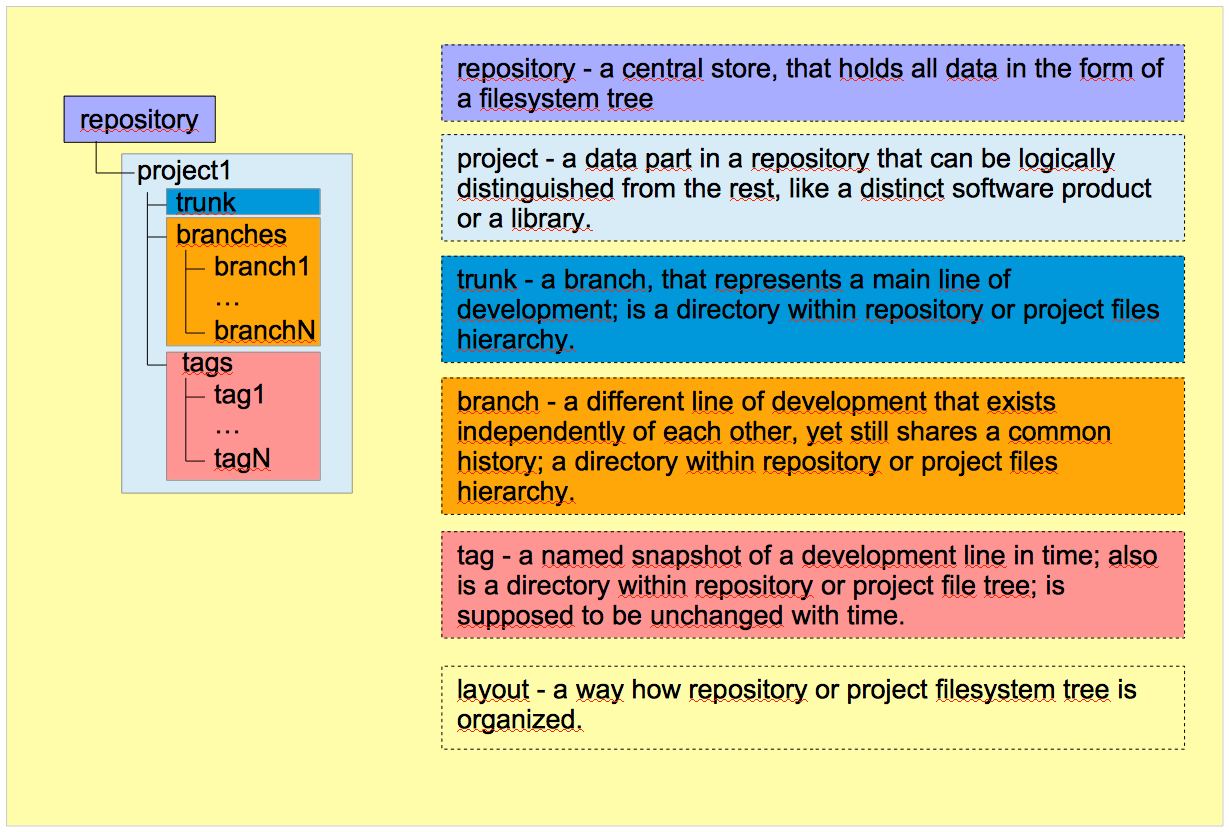
- repository – a central store, root directory, that holds all data in the form of a filesystem tree. A repository contains one or more projects.
- project – a data part in a repository, that can be logically distinguished from the rest, like a distinct software product or a library. Most projects have their own recognizable "main lines" and "divergent copies" of development.
- branch - a distinct line of development that exists independently of all others, yet still shares a common history. A branch is a directory within repository or project, which contains all files of that particular line of development.
- tag – a named snapshot of a development line in time. A tag is also a directory within repository or project. The main difference between branch and tag is that tags are supposed to be unchanged with time.
- trunk – a branch, that represents the main line of development. It's a directory within repository or project, which contains the main line of development.
- revision – a certain state of the filesystem tree, that has an assigned number and commentary.
- layout – a way how repository or project filesystem tree is organized.
- standard layout – a repository layout, that Subversion development team recommends to follow. According to that layout, each project resides in its own subdirectory within a repository and has three subdirectories for trunk, branches and
- , and tags.
A SVN repository can be organized in any way and SubGit can deal with any possible SVN repository layout.
A graphical representation of the explained SVN concepts:
Branches and Tags in Git
| Anchor | ||||
|---|---|---|---|---|
|
Unlike SVN, which stores data in the form of a filesystem tree, Git represents its data as a set of snapshots of a filesystem, that is being stored in Git's objects database. Due to this difference, most of Git concepts differ from their SVN counterparts albeit have the same names:
- repository – a directory, that contains Git database and metadata.
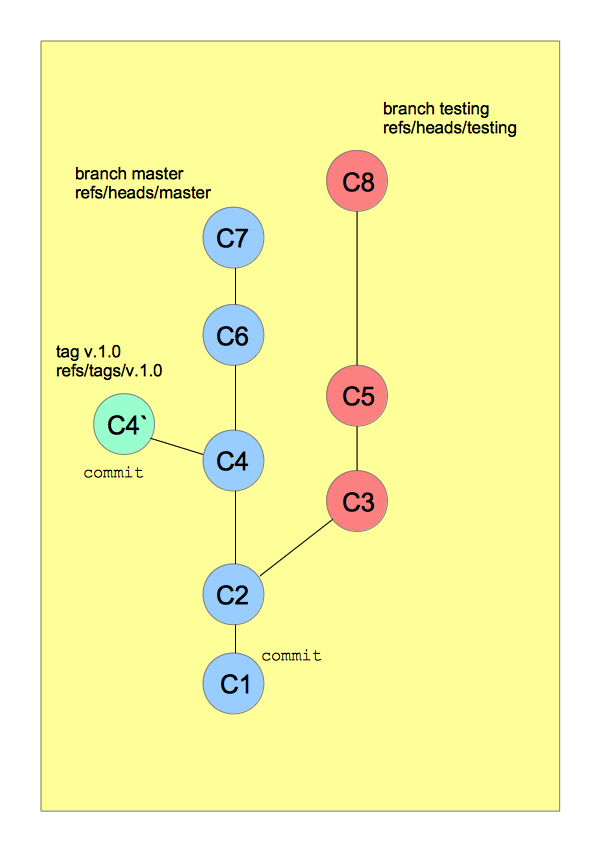
- commit – a Git object, that contains
- containing a pointer to a data snapshot in Git database. Essentially, the commit is a hash-named file in Git database, that contains a reference to a tree object, representing a data snapshot in time
- file tree snapshot along with author and date information. Commit is identified by its SHA1 hash value.
- branch – a reference to certain commit; a file in a Git database that contains a hash of a certain commit, thus referencing that particular commit.
- master branch – a default branch called master that's being created along with new repository. By agreement, it represents the main line of development, but technically it's just another branch.
- tag – like a branch, a reference to a commit - a file in a Git database that contains a hash of that particular commit. Git supports two kinds of *tags*: *lightweight* and *annotated*; SubGit supports only *lightweight tags*.
A graphical representation of the explained Git concepts:
...
SVN to Git mapping

...
Mapping Configuration Options
| Anchor | ||||
|---|---|---|---|---|
|
All the mapping configuration assembled in SubGit configuration file
...
, that is situated in subgit subdirectory inside a newly created Git repository:
| Code Block | ||||||
|---|---|---|---|---|---|---|
| ||||||
/GIT_REPOS_PATH … /subgit … /subgit/config |
Here is an example of how the [svn] of the configuration file may look like:
| Code Block | ||||||
|---|---|---|---|---|---|---|
| ||||||
[svn]
    url = http://svn.example.com/svn/repository_1/project_1
    trunk = trunk:refs/heads/master
    branches = branches/*:refs/heads/project_1/*
    branches = features_*:refs/heads/features/*
    tags = tags/*:refs/tags/*
    shelves = shelves/*:refs/shelves/*
    excludeBranches = features/feat_4510
excludePath = *.exe |
All the mapping settings reside in [svn] configurations section. There are three main settings groups:
...
- SVN project location:
...
- url - a URL leading to the SVN project.
- url - a URL leading to the SVN project.
...
- Branches and tags mapping rules:
- trunk - a path, relative to the URL, that leads to project's trunk.
...
- branches - a relative path to a directory, containing branches, or a path to a particular branch.
...
- tags - a relative path to a directory, containing tags, or a path to a particular tag.
...
- shelves - a relative path to a directory, where *shelves* will be kept.
...
- Refining mapping rules:
...
- excludeBranches - a relative path or path pattern with one wildcard, that point to branches or tags, that should be excluded from translation.
...
- excludeTags - same as
...
- excludeBranches
...
- .
...
- excludePath - an expression, representing files to be excluded from the translation.
...
- includePath - an expression, representing files to be included in the translation.
svn.urlAnchor svn.url svn.url
| Anchor | ||||
|---|---|---|---|---|
|
This option sets a URL to the SVN project, that is being translated into Git repository. SubGit translates a SVN project into a Git repository: not whole SVN repository to Git repository:
Thus, the `svn.url` setting is supposed to point to your SVN project root, not to SVN repository root; i.e., if you want to mirror, say, 'project1' to Git, then the svn.url must be set as follows:
| Code Block | ||||||
|---|---|---|---|---|---|---|
| ||||||
[svn]
url = http://example.com/svn/repository/project1 |
Most of the mapping settings rely on this path and their values are being set relative to this project root.
SubGit support all protocols SVN supports, so the svn.url can be set using the following protocol prefixes:
file://svn://svn+ssh://http://https://
Mapping settings
The next four options – trunk, branches, tags, shelves – actually tell SubGit how SVN to Git entities match to each other. Generic mapping syntax is:
| No Format |
|---|
<Mapping-option> = <Subversion-Path-Pattern>:<Git-Reference-Pattern> |
where
- Mapping-option - essentially, a mapping option: trunk, branches, tags or shelves.
- Subversion-Path-Pattern – a SVN directory path relative to `svn.url`.
- Git-Reference-Pattern – a path inside Git repository where references will be stored.
svn.trunkAnchor svn.trunk svn.trunk
| Anchor | ||||
|---|---|---|---|---|
|
This setting establishes a correspondence between SVN *trunk* and Git branch that represents the main line of development. Assuming, that SVN "main line of development" is being kept in a directory named trunk and Git master branch represents the "main line" in Git, the mapping may look like this:
trunk = trunk:refs/heads/master
where
- the first trunk is a mapping option name, determining which entity is being mapped.
- the second trunk is a path to SVN directory, which plays a role of trunk. This path is relative to specified
svn.urli.e. the full path to that directory consists of the URL and this path. Thus, suppose the URL is set like follows:
| No Format | ||
|---|---|---|
| ||
url = http://example.com/svn/repository/project1 |
In this case, the full path to the SVN trunk is equal to:
| No Format | ||
|---|---|---|
| ||
http://example.com/svn/repository/Project1/trunk |
- refs/heads/master – a path in Git repository, where the branch reference is kept. In this case, SVN trunk is being translated into Git master branch.
There are few rules that apply to the svn.trunk option:
| Info | ||
|---|---|---|
| ||
|
svn.branchesAnchor svn.branches svn.branches
This setting establishes a correspondence between SVN and Git branches. Its default value assumes standard SVN layout is used, i.e. that a SVN project branches reside in a directory named branches:
branches = branches/*:refs/heads/*
where
- the first branches is a mapping option name, determining which entity is being mapped.
- the second branches is a relative path to SVN directory, that consists SVN branches, or a path to a particular branch*.
- refs/heads/* – a Git repository path, where branches references will be kept.
This setting supports wildcards and thus can map a lot of branches at one time. If no wildcards used, the setting represents a path to one particular branch.
Rules that apply to the svn.branches:
| Info | ||
|---|---|---|
| ||
|
Taking the rules into account, the svn.branches options part in the configuration file may look like following:
| Code Block | ||||||
|---|---|---|---|---|---|---|
| ||||||
branches = branches/*:refs/heads/*
branches = feature_*:refs/heads/features/*
branches = hotfix/*_*:refs/heads/hotfix/*/*
branches = special_branch:refs/heads/special_branch |
svn.tagsAnchor svn.tags svn.tags
| Anchor | ||||
|---|---|---|---|---|
|
This setting establishes a correspondence between SVN and Git tags. The default value assumes standard SVN layout:
tags = tags/*:refs/tags/*
where
- the first tags is a mapping option name, determining which entity is being mapped.
- the second tags is a relative path to SVN directory, that consists SVN tags or a path to one particular tag.
- refs/tags/* - a Git repository path, where tags references will be kept.
SubGit translates SVN tags to Git lightweight tags and any kind of Git tags to SVN.
The svn.tags option is quite similar to the svn.branches, it supports both wildcards and direct mapping and the same rules apply to it:
| Info | ||
|---|---|---|
| ||
|
As an example, svn.tags settings may look like this:
| Code Block | ||||||
|---|---|---|---|---|---|---|
| ||||||
tags = 1.0/*:refs/tags/1.0/*
tags = 1.5.*:refs/tags/1.5/*
tags = tags/2.0.*/*:refs/tags/2.0/*/*
tags = tags/special_tag:refs/tags/special_tag |
svn.shelvesAnchor svn.shelves svn.shelves
| Anchor | ||||
|---|---|---|---|---|
|
Shelves are special entities being introduced by SubGit. SubGit creates shelves when it cannot determine branch name where particular commit belongs to. For example, a shelf will appear in SVN after in the following case:
- some commits were made to branch_A in Git,
- branch_A was merged with branch_B,
- branch_B (but not branch_A) was pushed to the repository.
In such case, SubGit will be able to see all the commits, but won’t be able to recognize the branch name to which they belong. So it will place them into shelves SVN directory.
See a blog post "What are shelves really?" for more details on shelves.
The setting sets a directory in SVN where shelves will be stored:
shelves = shelves/*:refs/shelves/*
where
- the first shelves is a mapping option name, determining which entity is being mapped.
- the second shelves is a relative path to SVN directory intended to store shelves.
- refs/shelves/* – a Git repository path, where shelves references will be kept.
There are few rules that apply to the svn.shelves option:
| Info | ||
|---|---|---|
| ||
|
svn.excludeBranches, svn.excludeTagsAnchor svn.excludeBranches svn.excludeBranches
svn.excludeTagsAnchor svn.excludeBranches svn.excludeBranches
These two settings do reverse job: while all the previous settings tell what to include, these tell SubGit which branches or tags to be excluded from translation. They are interchangeable, any of the two can be used to exclude both *branches* and *tags*.
The settings syntax as simple as:
excludeBranches = SIMPLE_PATTERNexcludeTags = SIMPLE_PATTERN
The SIMPLE_PATTERN represents a path relative to svn.url, that leads to a branch or a tag that should be excluded. The path can be direct or it may contain one single wildcard. SubGit appends the SIMPLE_PATTERN to specified svn.url and excludes any paths that match the resulting pattern. To illustrate the concept, assume you have the following settings:
| Code Block | ||||||
|---|---|---|---|---|---|---|
| ||||||
[svn]

url = http://example.com/svn/repository/project1
…
branches = branches/*:refs/heads/* |
You want to import all the branches excluding some "features" branches. In such case, you can exclude them using the following setting:
| Code Block | ||||||
|---|---|---|---|---|---|---|
| ||||||
excludeBranches = branches/feature_* |
assuming that the branches you don't want to include have feature_* name pattern.
In this case, SubGit will exclude any branches or tags that match to the following path:
| No Format |
|---|
http://example.com/svn/repository/Project1/branches/feature_* |
svn.excludePath, svn.includePathAnchor svn.excludePath svn.excludePath
| Anchor | ||||
|---|---|---|---|---|
|
These are settings that provide a possibility to exclude (or vice versa, include) some files from translation. It may be useful e.g. if you have some big files in SVN that you don't want to be present in Git repository. The syntax is simple:
excludePath = PATTERNincludePath = PATTERN
| Warning |
|---|
The |
The PATTERN is an expression that represents files to be excluded or included. Its format is described below:
- The
PATTERNcan be recursive and non-recursive.- A
PATTERNis treated as recursive if it doesn't contain slashes "/". SubGit will recursively search all specified trunk, branches and tags directories and exclude all files whose names match to thePATTERN.
A recursive example:excludePath = *.html
SubGit will exclude all the *.html files in all the mapped directories. A
PATTERNis treated as non-recursive if it does contain one or more slashes "/". SubGit will exclude any files in trunk, branches and tags directories, paths to which match to thePATTERN.
A non-recursive example:
excludePath = */*.html
SubGit will search for *.html files in second level directories within trunk, branches and tags directories, i.e. it will exclude the following files:No Format nopanel true http://example.com/svn/project/trunk/*/*.html http://example.com/svn/project/branches/*/*/*.html http://example.com/svn/project/tags/*/*/*.html
- A
A particular non-recursive
PATTERNcase with leading slash "/" represents a particular path to be excluded or included. E.g., if standard SVN project layout is used andsvn.urlis set to the following:No Format nopanel true http://example.com/svn/projectAnd
svn.includePathis set like this:Code Block language text theme FadeToGrey title svn.includePath includePath = /DocsSuch the setting will include only 'Docs' directory within trunk, branches and tags directories: that means SubGit will translate only paths below:
No Format nopanel true http://example.com/svn/project/trunk/Docs http://example.com/svn/project/branches/*/Docs http://example.com/svn/project/tags/*/DocsSimilarly, the following settings will exclude all the *.html files within 'Docs' directory in trunk, branches and tags directories:
Code Block language text theme FadeToGrey title svn.excludePath excludePath = /Docs/*.htmlThat is such setting will exclude the following paths:
No Format nopanel true http://example.com/svn/project/trunk/Docs/*.html http://example.com/svn/project/branches/*/Docs/*.html http://example.com/svn/project/tags/*/Docs/*.html- Trailing slash "/" in non-recursive
PATTERNis not allowed. - A wildcard "*" means as any number of legal symbols. It can be used both in recursive or non-recursive patterns.
- A question mark "?" means any one legal symbol. It can be used both in recursive or non-recursive patterns.
Brackets "[ ]" set a list of possible characters in the
PATTERN:Code Block language text theme FadeToGrey title svn.excludePath excludePath = [aoe]*.htmlSuch the setting will recursively exclude all the \*.html files which name starts with 'a', 'o' or 'e'.
Spaces within the
PATTERNare allowed:Code Block language text theme FadeToGrey title excludePath excludePath = some file name excludePath = some directory/*.exebut leading and trailing spaces need to be quoted:
Code Block language text theme FadeToGrey title svn.includePath includePath = "filename " includePath = "directory /*.exe"otherwise, SubGit will ignore leading/trailing spaces.
Warning Note, that if you have two directories or files at the same SVN file structure level, whose names differ only by leading or trailing spaces - say, "Docs" and "Docs " — that one containing trailing or leading spaces will not be imported/mirrored!
Two consecutive asterisks "**" in non-recursive
PATTERNmean path of any length.A
PATTERNwith leading asterisks:Code Block language text theme FadeToGrey title excludePath excludePath = **/foo/*.exemeans foo directory with *.exe files anywhere in SVN project. Leading asterisks pattern has some peculiarity: if you have a directory where all the files match given
PATTERN– then not only files will be excluded, the directory itself will not be mirrored/imported as well. Thus, if foo directory contains only *.exe files, then foo will not be imported/mirrored.Trailing asterisks allows to create non-recursive pattern that will match to directories only, namely:
Code Block language text theme FadeToGrey title svn.excludePath excludePath = Docs/**will exclude Docs directory in trunk, branches and tags root, but won't touch files with the name Docs.
Two consecutive asterisks within path pattern mean a path of any length; that is, setting like:
Code Block language text theme FadeToGrey title svn.excludePath excludePath = Docs/**/*.exewill exclude any *.exe files in Docs directory and all its subdirectories.
When branches, tags or paths are excluded from the translation with the help of one of the above options, modifications to those branches or paths made in Subversion project would not be translated to Git, as well as changes in Git repository made to those locations would not appear in Subversion.
Related documentation.
Branches and tags mapping examples