Branches mapping is a set of rules that establish a correspondence between SVN and Git branches and tags. These rules are defined by branches mapping configuration options in SubGit configuration file.
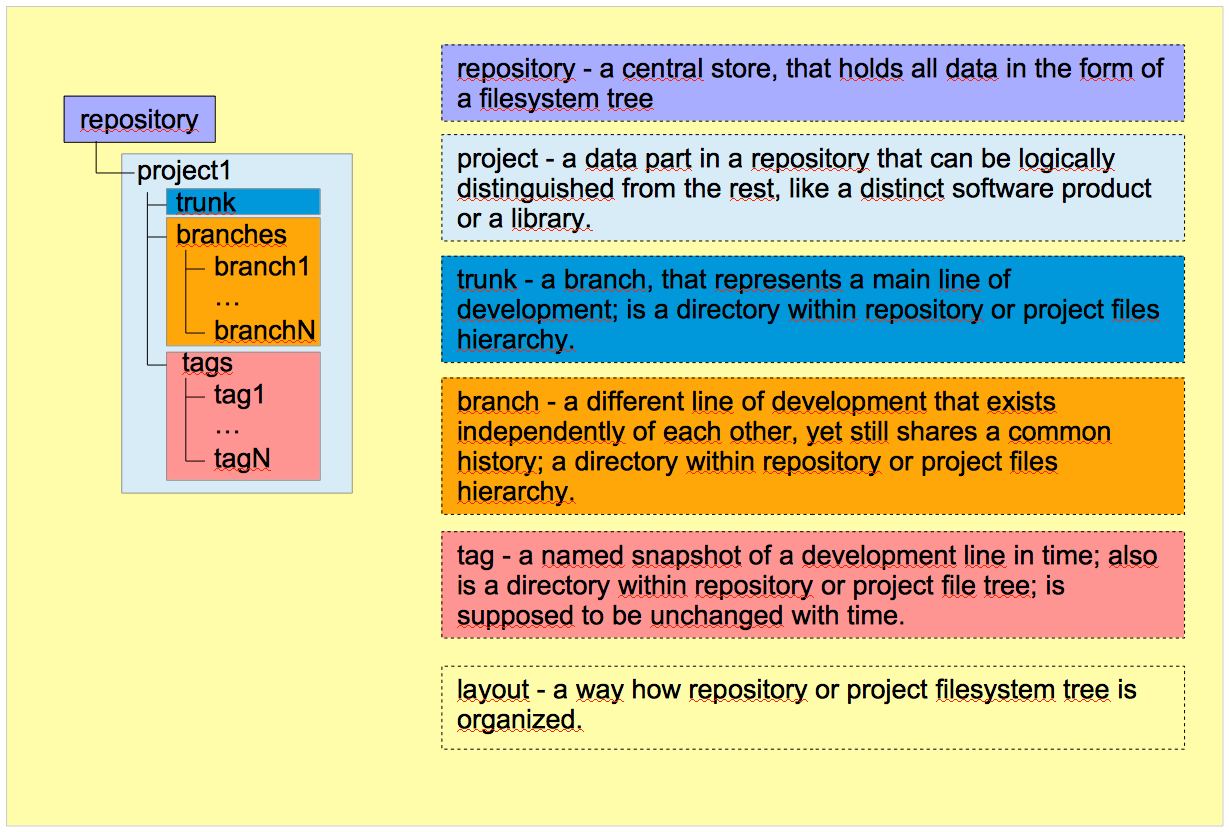
There are few key Subversion concepts, that matter in the context of SubGit mapping process:
A SVN repository can be organized in any way and SubGit can deal with any possible SVN repository layout.
A graphical representation of the explained SVN concepts:
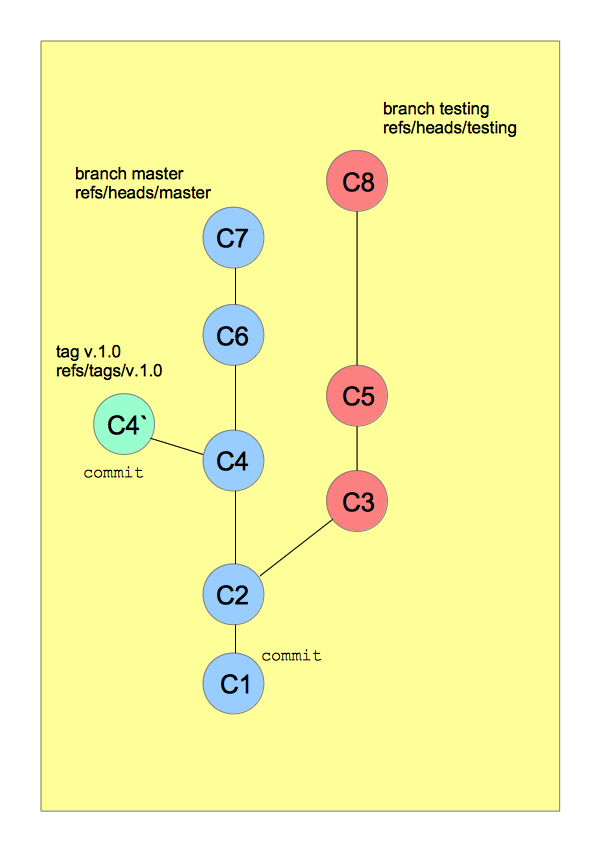
Unlike SVN, which stores data in the form of a filesystem tree, Git represents its data as a set of snapshots of a filesystem, that is being stored in Git's objects database. Due to this difference, most of Git concepts differ from their SVN counterparts albeit have the same names:
A graphical representation of the explained Git concepts:
All the mapping configuration assembled in SubGit configuration file. The configuration file is being created at the SVN-to-Git translation beginning by SubGit's configure subcommand. The file is situated in subgit subdirectory inside a newly created Git repository:
/GIT_REPOS_PATH
    …
    /subgit
       …
config |
Here is an example of how the [svn] of the configuration file may look like:
[svn]
    url = http://svn.example.com/svn/repository_1/project_1
    trunk = trunk:refs/heads/master
    branches = branches/*:refs/heads/project_1/*
    branches = features_*:refs/heads/features/*
    tags = tags/*:refs/tags/*
    shelves = shelves/*:refs/shelves/*
    excludeBranches = features/feat_4510
excludePath = *.exe |
All the mapping settings reside in [svn] configurations section. There are three main settings groups:
svn.urlThis option sets a URL to the SVN project, that is being translated into Git repository. SubGit translates a SVN project into a Git repository: not whole SVN repository to Git repository:

Thus, the `svn.url` setting is supposed to point to your SVN project root, not to SVN repository root; i.e., if you want to mirror, say, 'project1' to Git, then the svn.url must be set as follows:
[svn]
url = http://example.com/svn/repository/project1 |
Most of the mapping settings rely on this path and their values are being set relative to this project root.
SubGit support all protocols SVN supports, so the svn.url can be set using the following protocol prefixes:
file://svn://svn+ssh://http://https://The next four options – trunk, branches, tags, shelves – actually tell SubGit how SVN to Git entities match to each other. Generic mapping syntax is:
<Mapping-option> = <Subversion-Path-Pattern>:<Git-Reference-Pattern> |
where
svn.trunkThis setting establishes a correspondence between SVN *trunk* and Git branch that represents the main line of development. Assuming, that SVN "main line of development" is being kept in a directory named trunk and Git master branch represents the "main line" in Git, the mapping may look like this:
trunk = trunk:refs/heads/master
where
svn.url i.e. the full path to that directory consists of the URL and this path. Thus, suppose the URL is set like follows:url = http://example.com/svn/repository/project1 |
In this case, the full path to the SVN trunk is equal to:
http://example.com/svn/repository/Project1/trunk |
There are few rules that apply to the svn.trunk option:
|
svn.branches
This setting establishes a correspondence between SVN and Git branches. Its default value assumes standard SVN layout is used, i.e. that a SVN project branches reside in a directory named branches:
branches = branches/*:refs/heads/*
where
This setting supports wildcards and thus can map a lot of branches at one time. If no wildcards used, the setting represents a path to one particular branch.
Rules that apply to the svn.branches:
|
Taking the rules into account, the svn.branches options part in the configuration file may look like following:
branches = branches/*:refs/heads/* branches = feature_*:refs/heads/features/* branches = hotfix/*_*:refs/heads/hotfix/*/* branches = special_branch:refs/heads/special_branch |
svn.tagsThis setting establishes a correspondence between SVN and Git tags. The default value assumes standard SVN layout:
tags = tags/*:refs/tags/*
where
SubGit translates SVN tags to Git lightweight tags and any kind of Git tags to SVN.
The svn.tags option is quite similar to the svn.branches, it supports both wildcards and direct mapping and the same rules apply to it:
|
As an example, svn.tags settings may look like this:
tags = 1.0/*:refs/tags/1.0/* tags = 1.5.*:refs/tags/1.5/* tags = tags/2.0.*/*:refs/tags/2.0/*/* tags = tags/special_tag:refs/tags/special_tag |
svn.shelvesShelves are special entities being introduced by SubGit. SubGit creates shelves when it cannot determine branch name where particular commit belongs to. For example, a shelf will appear in SVN after in the following case:
In such case, SubGit will be able to see all the commits, but won’t be able to recognize the branch name to which they belong. So it will place them into shelves SVN directory.
Find more details on the shelves in "What are shelves really?" blog post.
The setting sets a directory in SVN where shelves will be stored:
shelves = shelves/*:refs/shelves/*
where
There are few rules that apply to the svn.shelves option:
|
svn.excludeBranches, svn.excludeTagsThese two settings do reverse job: while all the previous settings tell what to include, these tell SubGit which branches or tags to be excluded from translation. They are interchangeable, any of the two can be used to exclude both *branches* and *tags*.
The settings syntax as simple as:
excludeBranches = SIMPLE_PATTERNexcludeTags = SIMPLE_PATTERN
The SIMPLE_PATTERN represents a path relative to svn.url, that leads to a branch or a tag that should be excluded. The path can be direct or it may contain one single wildcard. SubGit appends the SIMPLE_PATTERN to specified svn.url and excludes any paths that match the resulting pattern. To illustrate the concept, assume you have the following settings:
[svn] url = http://example.com/svn/repository/project1 … branches = branches/*:refs/heads/* |
You want to import all the branches excluding some "features" branches. In such case, you can exclude them using the following setting:
excludeBranches = branches/feature_* |
assuming that the branches you don't want to include have feature_* name pattern.
In this case, SubGit will exclude any branches or tags that match to the following path:
http://example.com/svn/repository/Project1/branches/feature_* |
svn.excludePath, svn.includePathThese are settings that provide a possibility to exclude (or vice versa, include) some files from translation. It may be useful e.g. if you have some big files in SVN that you don't want to be present in Git repository. The syntax is simple:
excludePath = PATTERNincludePath = PATTERN
The |
The PATTERN is an expression that represents files to be excluded or included. Its format is described below: