- Login to console on Gerrit server and install SubGit tool according to the Installation guide.
Download SubGit plugin for Gerrit server.
MD5 checksum: 3902cf714c856524e8f4815ad70c00f3$ wget https://subgit.com/download/subgit-gerrit-plugin-1.0.0-EAP4.jar --2017-05-11 18:15:37-- https://subgit.com/download/subgit-gerrit-plugin-1.0.0-EAP4.jar Resolving subgit.com (subgit.com)... 138.201.118.241 Connecting to subgit.com (subgit.com)|138.201.118.241|:443... connected. HTTP request sent, awaiting response... 200 OK Length: 9709051 (9.3M) [application/java-archive] Saving to: ‘subgit-gerrit-plugin-1.0.0-EAP4.jar’ 100%[============================================================================================================>] 9,709,051 814KB/s in 10s 2017-05-11 18:15:48 (938 KB/s) - ‘subgit-gerrit-plugin-1.0.0-EAP4.jar’ saved [9709051/9709051]Move downloaded file into
pluginsdirectory:$ mv ./subgit-gerrit-plugin-1.0.0-EAP4.jar GERRIT_SITE/plugins
where
GERRIT_SITE– the directory that was used as$sitepathduring Gerrit installation.
Open Gerrit configuration file residing by the following path:
GERRIT_SITE/etc/gerrit.config
where
GERRIT_SITE– the directory that was used as$sitepathduring Gerrit installation.
Locatereceive.timeoutparameter and set it to 0:[receive] timeout = 0
if you have Git installed on this machine, it can be done by the following command:$ git config -f GERRIT_SITE/etc/gerrit.config receive.timeout 0
Restart Gerrit daemon:
$ GERRIT_SITE/bin/gerrit.sh restart
where
GERRIT_SITE– the directory that was used as$sitepathduring Gerrit installation.
$ /gerrit/bin/gerrit.sh restart
            Stopping Gerrit Code Review: OK
            Starting Gerrit Code Review: OK
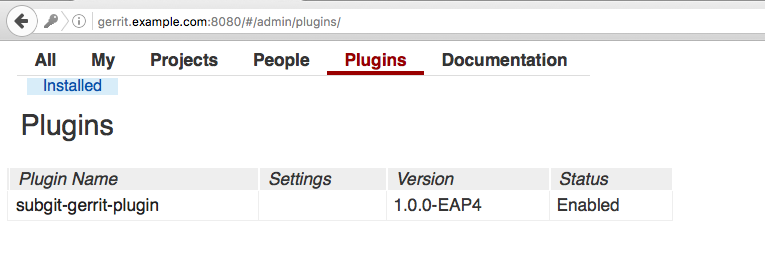
Check SubGit plugin is showed in Gerrit:
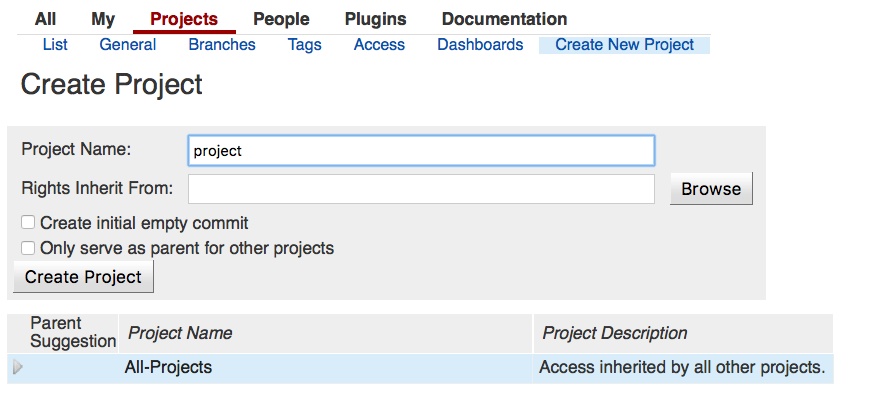
- Create empty Git repository:
Open Gerrit server console and step into
gitdirectory withinGERRIT_SITE:$ cd GERRIT_SITE/git
where
GERRIT_SITE– the directory that was used as$sitepathduring Gerrit installation.
newly created project directory should be present here and named
<given project name>.git$ ls -l drwxr-xr-x. 7 root root 100 May 10 12:00 All-Projects.git drwxr-xr-x. 7 root root 100 May 10 12:00 All-Users.git drwxr-xr-x. 7 root root 100 May 11 19:26 project.git
Run this command to configure SubGit import:
$ subgit configure --layout auto --trunk TRUNK SVN_URL GIT_REPO
where
SVN_URL– SVN project URL.GIT_REPO– a path to new Git repository.TRUNK– a path, relative toSVN_URL, that leads to an SVN directory that plays a role of the main line of development.
$ subgit configure --layout auto --trunk trunk http://example.com/svn/repository/project ./repo.git

            SubGit version 3.2.4 ('Bobique') build #3670

            Configuring writable Git mirror of remote Subversion repository:
                Subversion repository URL : http://example.com/svn/repository/project
                Git repository location   : ./repo.git

            Detecting peg location...
            Authentication realm: <http://example.com:80> Subversion Repository
            Username [user]: user
            Password [user]:
            Peg location detected: r10248 project/trunk
            Fetching SVN history... Done.
            Growing trees... Done.
            Project origin detected: r1 project/trunk
            Building branches layouts... Done.
            Combing beards... Done.
            Generating SVN to Git mapping... Done.

            CONFIGURATION SUCCESSFUL

            To complete SubGit installation do the following:

            1) Adjust Subversion to Git branches mapping if necessary:
                /home/user/repo.git/subgit/config
            2) Define at least one Subversion credentials in default SubGit passwd file at:
                /home/user/repo.git/subgit/passwd
               OR configure SSH or SSL credentials in the [auth] section of:
                /home/user/repo.git/subgit/config
            3) Optionally, add custom authors mapping to the authors.txt file(s) at:
                /home/user/repo.git/subgit/authors.txt
            4) Run SubGit 'install' command:
                subgit install ./repo.git
Specify authors mapping
Configure authors mapping in default authors mapping file:
GIT_REPOS/subgit/authors.txt
Or change
core.authorsoption so that it points to the global authors mapping file.Find more details about authors mapping in Authors mapping article.
Import data into the Git repository by the command:
$ subgit install GIT_REPO |
where
GIT_REPO – a path to the Git repository.
|
When the command completed, you can clone your new Git repository and start to work with it:
$ git clone GIT_REPO WORK_TREE |
where
WORK_TREE – a path to your working copy.
|
If Git warns you that you are cloning an empty repository and you don't see your files in the working tree, most probably automatic branches and tags mapping didn't work correctly. In this case, mapping has to be set manually, see details on mapping in Branches and tags mapping. |
Have you faced with any problems, see the following guide for more details:
- SubGit troubleshooting guide
- SubGit configuration file reference
- Authors mapping
- Authors mapping examples
- Branches and tags mapping
- Branches and tags mapping examples
- Automated branches and tags mapping generation
Note: no license key required for import! |